4.8.4 OneSIG Integration
OneSIG integration connects the OneSIG third-party policy API to Flocks device management. Before integration, add an API verification configuration in the OneSIG console, obtain ApiKey and Secret, then return to Flocks and enter the device instance configuration.
This section covers the configuration for the OneSIG policy API template. It applies to interfaces for device status, assets, policies, allowlists, blocklists, block allowlists, HTTP protection, and similar capabilities. This template uses the ApiKey + Secret HMAC-SHA1 signature mechanism.
Add API Verification in OneSIG
After logging in to the OneSIG console, open Protection Policy at the top, select API Linkage in the left menu, then click Add on the right.
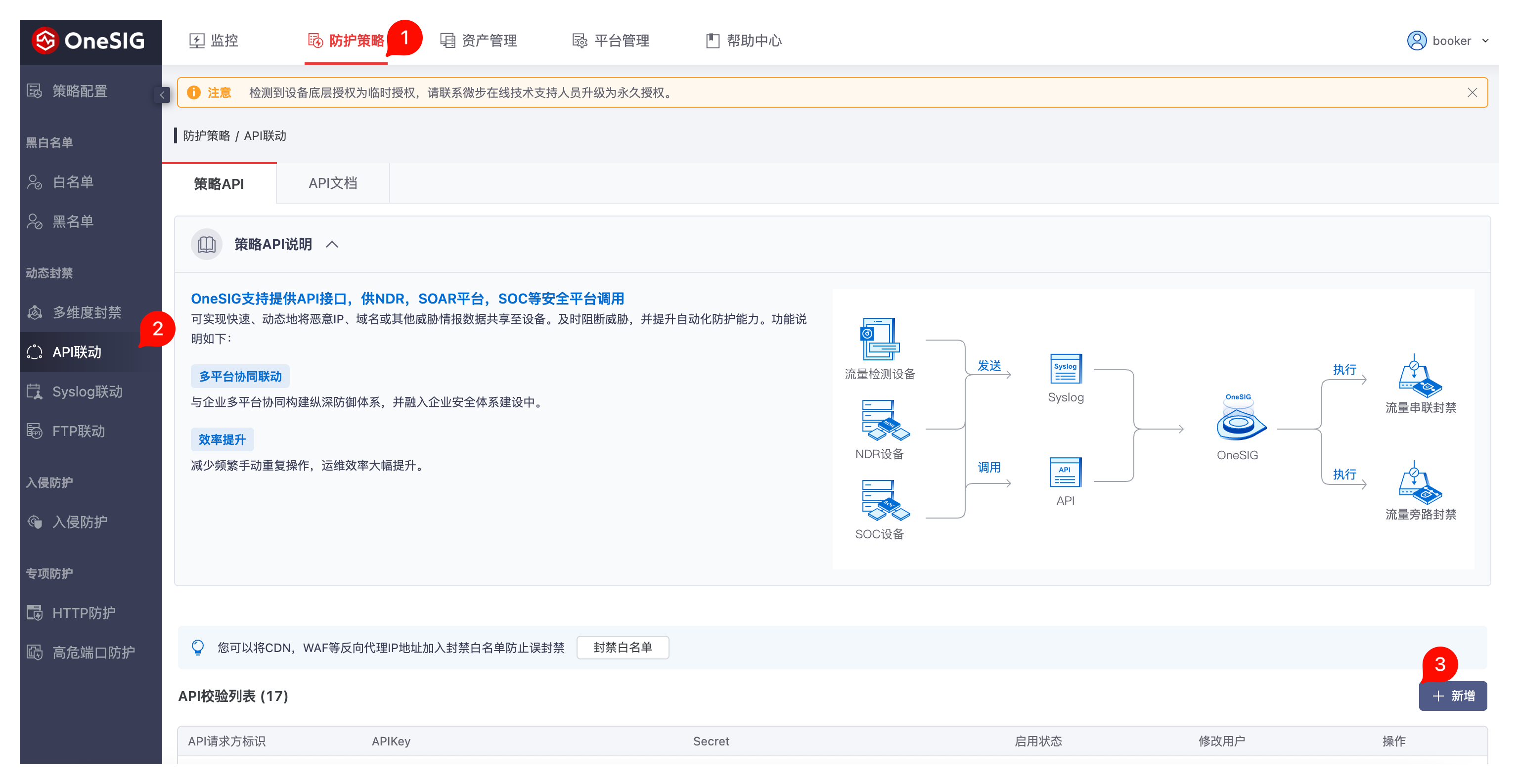
After adding the API verification configuration, copy the generated ApiKey and Secret from the page and save them in a secure location.
Prepare:
- ApiKey: API requester identifier added on the OneSIG API Linkage page.
- Secret: Signature key generated together with this
ApiKey. - Base URL: OneSIG console or device API address, such as
https://onesig.example.com.
If the production environment has multiple callers, create a separate API verification configuration for Flocks so later auditing, disabling, and key rotation are easier.
Enter Configuration in Flocks
Open Device Integration, select the OneSIG policy API template, and enter the instance configuration.
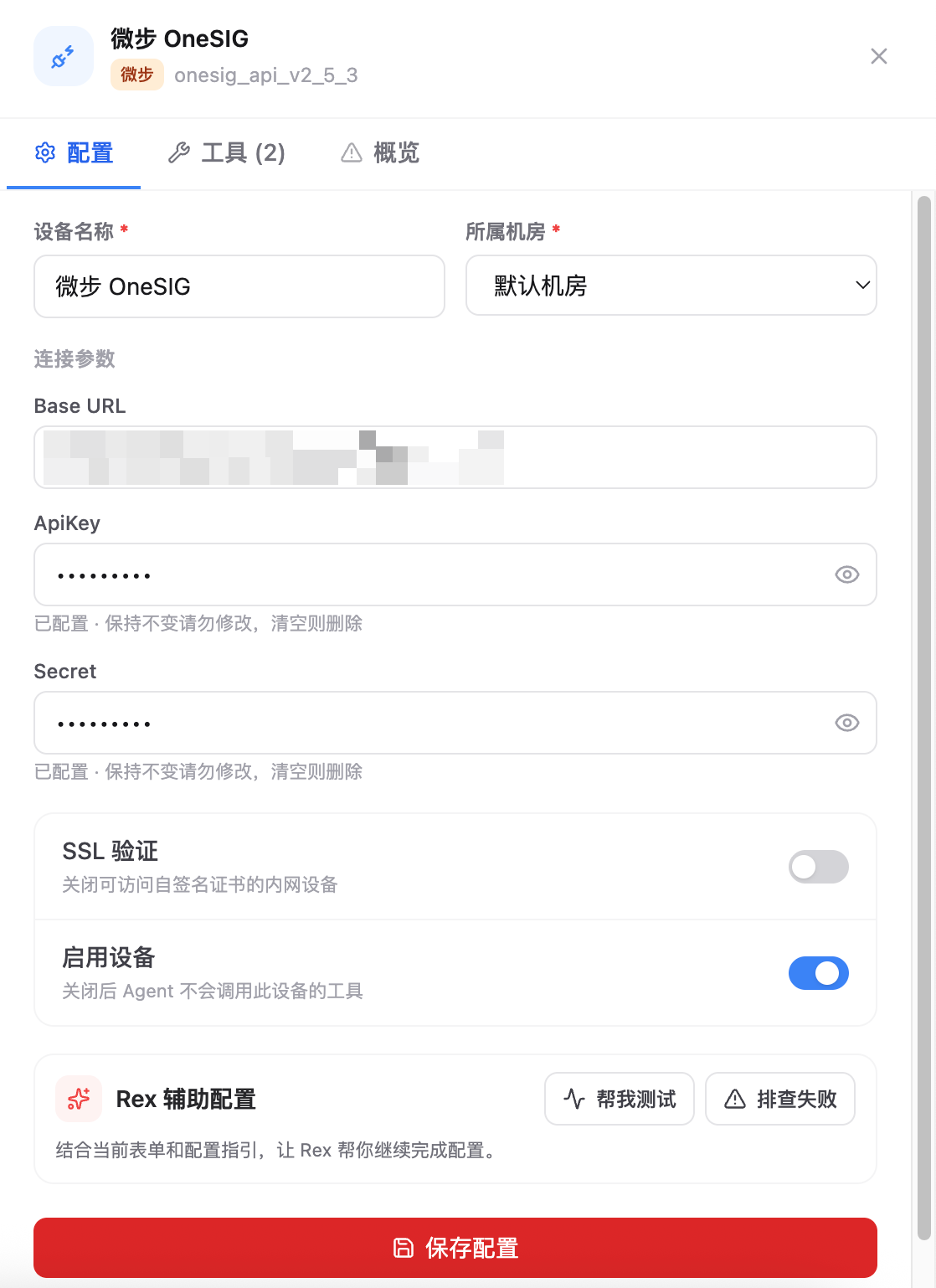
Key fields:
- Device Name: Current OneSIG instance name.
- Data Center: Data center or region that the device belongs to.
- Base URL: Enter the OneSIG console or device API address. Usually no interface path needs to be appended.
- ApiKey: Enter the
ApiKeygenerated on the OneSIG API Linkage page. - Secret: Enter the
Secretpaired with theApiKey. - SSL Verification: Can be disabled when an internal self-signed certificate causes the connectivity test to fail.
- Enable Device: Keep this enabled so Agent can call this device's tools.
After saving, run the connectivity test. After the test succeeds, the OneSIG instance appears in the device list and can be called by Agent or Workflow.
FAQ
| Question | Solution |
|---|---|
| Cannot find the API Linkage entry point | Confirm that the current account has protection policy or policy configuration management permissions. |
| Connectivity test authentication failed | Check again that ApiKey and Secret come from the same API verification configuration. Avoid copying spaces or using an old key. |
| Interface returns a signature error | Confirm that the system time is accurate. The OneSIG policy API signature uses the current Unix timestamp. |
| The page is accessible but the API is not | Check whether Base URL is a OneSIG address accessible from the Flocks environment, and confirm that the network policy allows access. |
| HTTPS certificate failure | For internal self-signed certificate scenarios, disable SSL Verification and retry. |