Real-time NDR Alert Denoising Workflow
Real-time NDR Alert Denoising Workflow is a built-in Flocks Workflow capability for suppressing noise in continuously arriving NDR alerts and HTTP traffic logs. It ingests data from TDP, SkyEye, and similar security devices, filters and aggregates high-frequency duplicate or low-value events at the Workflow layer, and passes only alerts that need attention to triage, notification, or downstream handling.
This Workflow is shown as stream_alert_denoise on the Workflow page.
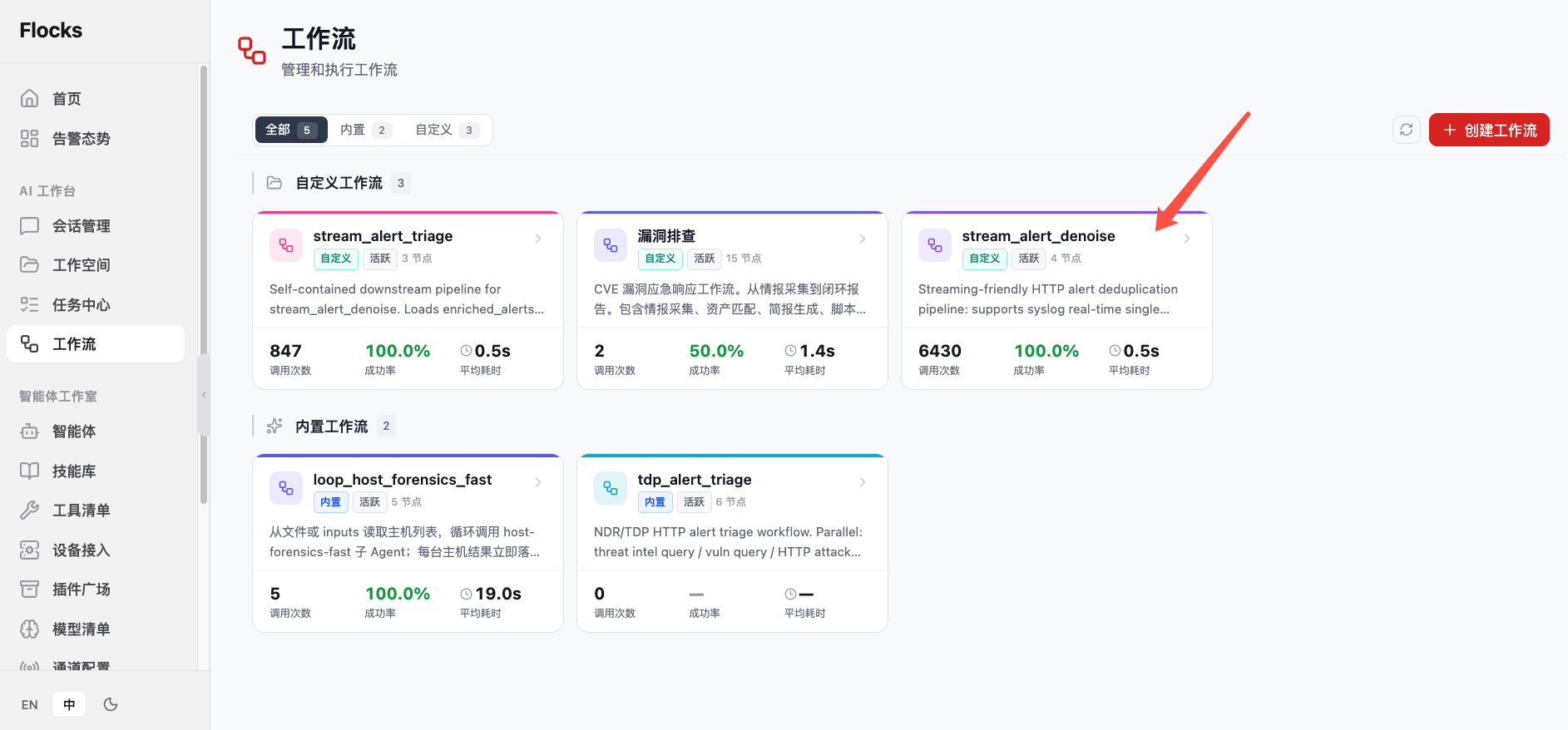
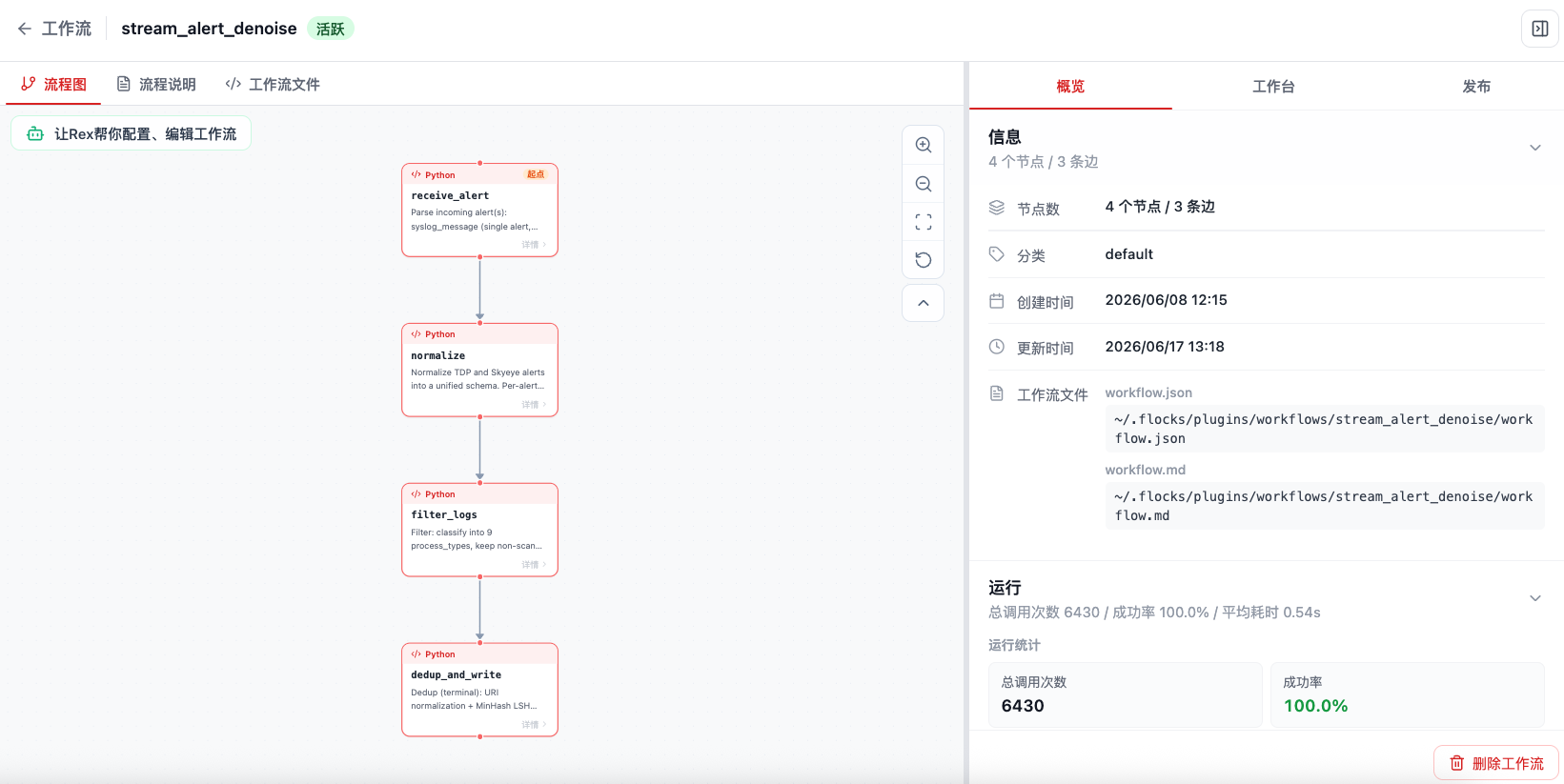
Click stream_alert_denoise to open the Workflow Details page. The left side shows the real-time NDR alert denoising flowchart, and the Overview on the right shows node count, Workflow file path, runtime statistics, and the execution history entry.
1. Purpose
stream_alert_denoise targets real-time logs and alerts, not one-off manual triage. Its goal is to complete the following before logs enter manual analysis or alert triage:
- Alert Deduplication: merge repeated events with the same attack characteristics, same source / destination assets, same URL, or same session window.
- Low-Value Noise Filtering: filter health checks, static resource access, known allowlists, test traffic, and low-confidence repeated events.
- Similar Event Aggregation: aggregate HTTP traffic logs or NDR alerts of the same type by time window, asset, rule, path, status code, and other dimensions.
- Initial priority screening: retain high-risk events worth further triage and output summaries for downstream alert triage workflows or channel notifications.
2. Data Sources
The current real-time NDR alert denoising Workflow supports noise suppression for HTTP traffic logs. Common data sources include:
| Data source | Integration method | Notes |
|---|---|---|
| TDP | Device log push, Syslog, Kafka, or Webhook | Suitable for ingesting HTTP access logs, alert logs, or security events generated by TDP. |
| SkyEye | Device log push, Syslog, Kafka, or Webhook | Suitable for ingesting NDR traffic logs and alert events from SkyEye. |
| Other NDR / traffic devices | Syslog, Kafka, Webhook, or file relay | As long as the data can be converted into Workflow inputs, the denoising logic can be reused. |
Before integration, confirm device-side fields such as source IP, destination IP, domain, URL, HTTP method, status code, rule name, alert level, timestamp, device ID, and raw log content. The more stable the fields are, the easier it is to reuse denoising rules.
3. Alert Denoising Method
The real-time NDR alert denoising Workflow uses a combination of fixed rules + machine learning algorithms.
Fixed rules are suitable for noise that is clear, explainable, and maintainable over time:
- Allowlisted assets, domains, and URL paths.
- Static resources, health probes, and known test traffic.
- Repeated events with the same
dedup_key, same five-tuple, or same rule hit within a short time window. - Clearly low-risk status codes, path patterns, or device rules.
Machine learning algorithms are suitable for duplicate and similar noise that is hard to fully enumerate with rules:
- Cluster similar events by log text, URL, host, path, rule name, and other features.
- Use historical frequency and behavior baselines to identify spikes, periodic noise, or recurring repeated events.
- Assign confidence to denoising results and retain low-confidence events for later human review.
In practice, first use fixed rules for deterministic noise, then use machine learning algorithms for similar aggregation and dynamic noise, and finally pass high-risk or low-confidence events to the alert triage Workflow for further analysis.
4. Deployment Method
This Workflow can be used as a built-in Workflow or placed under the Workflow directory in the user plugin directory:
~/.flocks/plugins/workflows/
└── stream_alert_denoise/
    ├── workflow.md
    ├── workflow.json
    └── ...
After placement, refresh Flocks. The system automatically scans Workflow directories under ~/.flocks/plugins/workflows and identifies and displays them on the Workflow page. After recognition, you can enter the detail page to view the flowchart, publish Syslog / Kafka / Webhook triggers, or ask Rex to help configure integration parameters.
For more Workflow installation and invocation methods, see Workflow and Invoke Workflow.
5. Enable Syslog Invocation for the Workflow
A common production method for the real-time NDR alert denoising Workflow is to publish the Workflow as Syslog ingestion. After it is enabled, Flocks listens for Syslog data on the configured Host and Port. When TDP, SkyEye, or another log platform pushes HTTP traffic logs to that port, Flocks receives the Syslog data on the corresponding port and actively triggers the stream_alert_denoise Workflow.
Typical flow:
- Enter the
stream_alert_denoiseWorkflow Details page. - Switch to the Publish subpage on the right and select Syslog Ingestion.
- Configure the listening protocol, Host, Port, log format, and field name written to Workflow inputs.
- In TDP, SkyEye, or the log platform, configure the Syslog target as the listener address and port of the Flocks server. For TDP, see Configure Syslog Output for TDP.
- After device logs arrive, Flocks automatically triggers the Workflow for alert denoising.
You can use Flocks-assisted configuration or manually fill in Syslog parameters:
- Flocks-assisted Syslog configuration: Suitable for Rex to confirm protocol, format, listener address, port, input field, and sample logs through Q&A.
- Manual Syslog configuration parameters: Suitable when protocol, port, and field mappings are already clear.
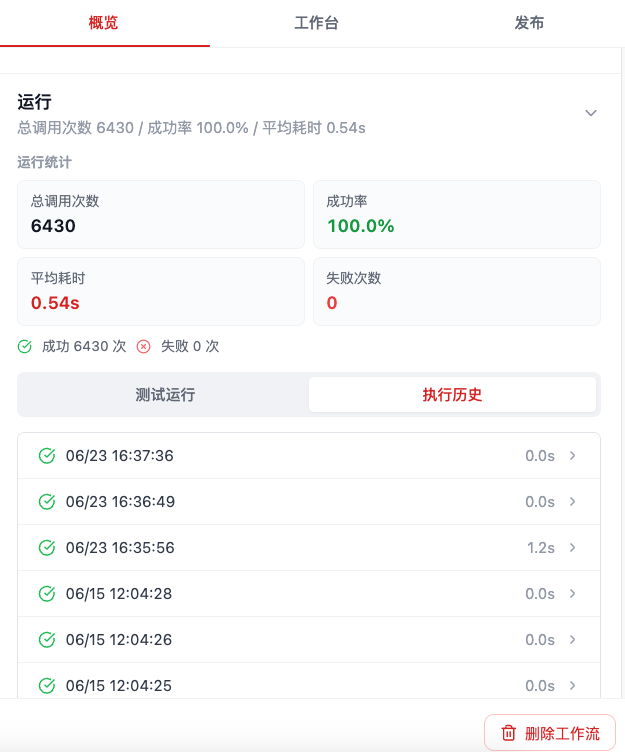
After Syslog is configured successfully and starts receiving device data, each Workflow run triggered by Syslog data is automatically counted as an invocation. On the Workflow Details page Overview, you can view total invocations, success rate, average duration, failure count, and each execution history entry. Click a history record to further troubleshoot a single run.
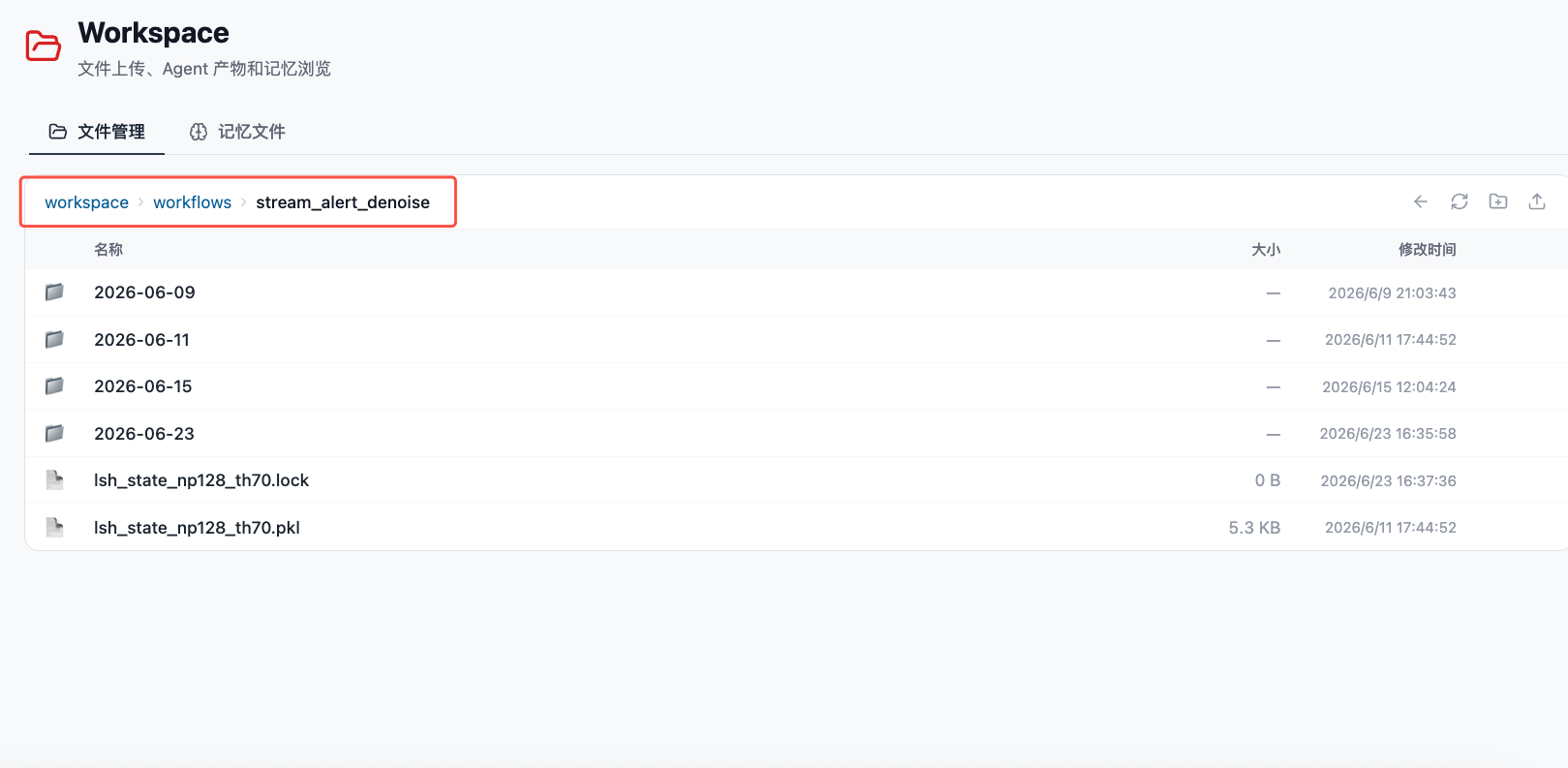
The real-time NDR alert denoising Workflow writes denoising results into the workspace Workflow directory:
workspace/workflows/stream_alert_denoise/This directory stores denoising results and intermediate state files by date. The later Batch NDR Triage Workflow reads these results and continues generating triage reports.
6. Output JSON Example
stream_alert_denoise returns structured fields and appends first-seen denoising results to dedup_result_NNN.jsonl. The first line of the JSONL file is the file header, and each later line is an enriched alert.
An example return result after one Syslog trigger:
{
  "dedup_summary": "stream_alert_denoise done: raw=1 -> normalized=1 -> filtered=1 -> enriched=1, unique=1 (compression 0.0%)",
  "input_mode": "syslog",
  "dedup_key": "b7428a52e96c835c9f72efb555d36772",
  "is_duplicate": false,
  "stats": {
    "raw_count": 1,
    "normalized_count": 1,
    "after_filter_count": 1,
    "after_dedup_count": 1,
    "unique_key_count": 1,
    "dedup_removed_count": 0,
    "dedup_ratio": 0.0,
    "dedup_state_persisted": true,
    "output_paths": [
      "~/.flocks/workspace/workflows/stream_alert_denoise/2026-06-11/dedup_result_001.jsonl"
    ]
  },
  "enriched_alerts": [
    {
      "id": "AZtRkZkzj",
      "sip": "1.2.3.4",
      "dip": "10.0.0.1",
      "net_type": "http",
      "req_http_url": "/admin",
      "threat_name": "SQL injection",
      "threat_confidence": "none",
      "_source_type": "tdp",
      "_process_type": "alert_not_scan_http_direction_in",
      "_threat_type": "SQL injection",
      "_lsh_cluster_id": 0,
      "dedup_key": "b7428a52e96c835c9f72efb555d36772",
      "is_duplicate": false
    }
  ],
  "output_paths": [
    "~/.flocks/workspace/workflows/stream_alert_denoise/2026-06-11/dedup_result_001.jsonl"
  ]
}
Here, is_duplicate=false means the alert is appearing for the first time and will be written to the result file. If identical or highly similar alerts arrive later, the Workflow returns the same or a similar dedup_key and marks them with is_duplicate=true as historical duplicates, preventing them from repeatedly entering downstream triage.
7. Machine Deployment Requirements
Alert denoising usually needs to run on a server and is not recommended for personal computers. Syslog, device callbacks, and log push data must be actively sent from security devices to the machine running Flocks. Personal computers usually do not provide a stable fixed address, always-on availability, or reliable network reachability.
Recommended server specifications:
| Item | Recommended configuration |
|---|---|
| Deployment form | Cloud host or internal VM |
| CPU / memory | 8 cores, 32 GB |
| Disk | 500 GB, with reserved space for logs and intermediate results |
| Operating system | CentOS, Ubuntu, or Rocky Linux |
| Runtime mode | Long-running node suitable for log reception and task execution |
8. Production Checklist
Before formally ingesting device data, complete the following checks:
- The server running Flocks can be reached by TDP, SkyEye, or the log platform.
- Syslog, Kafka, or Webhook ports, protocols, and firewall policies have been opened.
- A batch of real HTTP traffic log samples is ready for validating field mappings and denoising behavior.
- The destination of denoised outputs is clear, such as the alert triage Workflow, channel notification, file persistence, or a downstream system.
- Runtime logs, failure retry, disk capacity, and intermediate result retention policies have been planned.
Related Resources: Alert Denoising · TDP Integration · SkyEye Integration · Invoke Workflow