Batch NDR Triage Workflow
Batch NDR Triage Workflow is a continuous triage solution based on the built-in Flocks Workflow stream_alert_triage. It periodically reads denoising results produced by the real-time NDR alert denoising Workflow, performs batch triage on the remaining HTTP logs and alerts, and generates the triage report for the day.
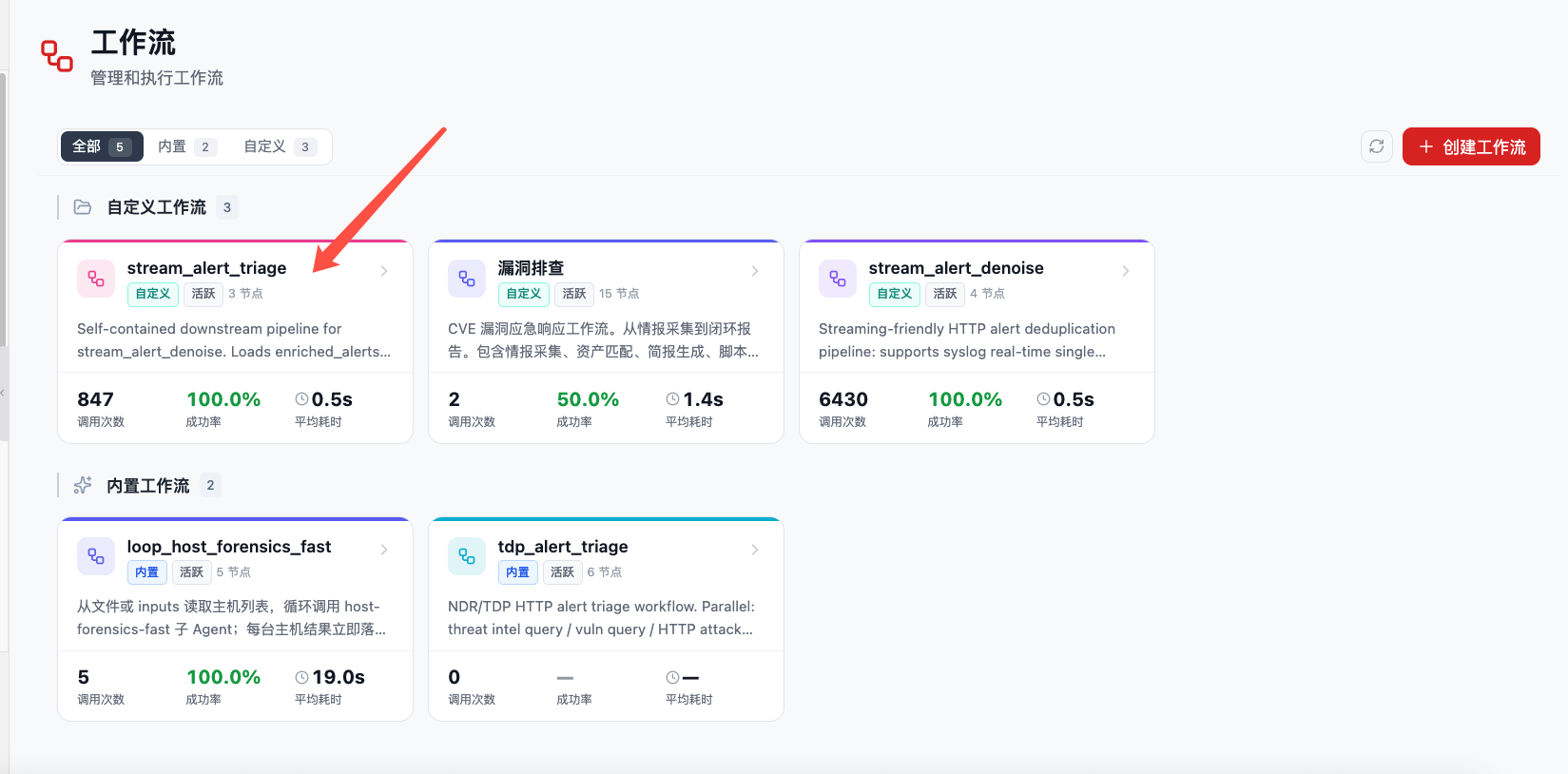
stream_alert_triage appears on the Workflow page as a custom or built-in Workflow card.
1. Purpose
The real-time NDR alert denoising Workflow continuously receives HTTP traffic logs pushed by TDP, SkyEye, and similar devices, and filters duplicate, low-value, or deterministic noise. stream_alert_triage then performs further triage on the remaining logs after denoising.
This workflow is optimized for:
- HTTP logs and NDR alerts that still need attention after denoising.
- Denoising result files archived by day or by time window.
- Duty shift, operations, and review scenarios that require periodic triage reports.
- Complex alerts that require intelligence, assets, vulnerabilities, and AI triage capabilities.
2. Prerequisites
Before using stream_alert_triage, complete the following:
| Prerequisite | Requirement |
|---|---|
| Large model configuration | Flocks has a usable large model configured and set as the default model. |
| Real-time NDR alert denoising Workflow | Real-time NDR Alert Denoising Workflow is configured and can generate denoising result files for the current day. |
| Data directory | stream_alert_triage can read the denoising result files written by the alert denoising Workflow. |
| Triage context | Threat intelligence, asset information, discovery results, or vulnerability information should be integrated to improve triage quality. |
| Task center | Required to trigger the Workflow periodically through scheduled tasks. |
3. Core Principle
The core logic of stream_alert_triage is to locate the day's denoising result files by input_date, read the retained log data after denoising, and complete batch triage with multiple context sources.
The triage process usually combines:
- Intelligence: external intelligence and history for IPs, domains, URLs, file hashes, and other IOCs.
- Flocks AI triage capability: generates triage conclusions based on log fields, request paths, status codes, rule hits, and context.
- Discovery: enriches public asset, exposed service, DNS resolution, and port information.
- Asset vulnerability analysis: determines risk level using target assets, components, vulnerabilities, and attack paths.
- NDR HTTP log fields: source / destination IP, domain, URL, HTTP method, status code, rule name, alert level, and raw logs.
The Workflow summarizes triage results and generates report files such as pipeline_summary.md for session summaries, channel notifications, or human review.
4. Deployment Method
This Workflow can be used as a built-in Workflow or placed under the Workflow directory in the user plugin directory:
~/.flocks/plugins/workflows/
└── stream_alert_triage/
    ├── workflow.md
    ├── workflow.json
    └── ...
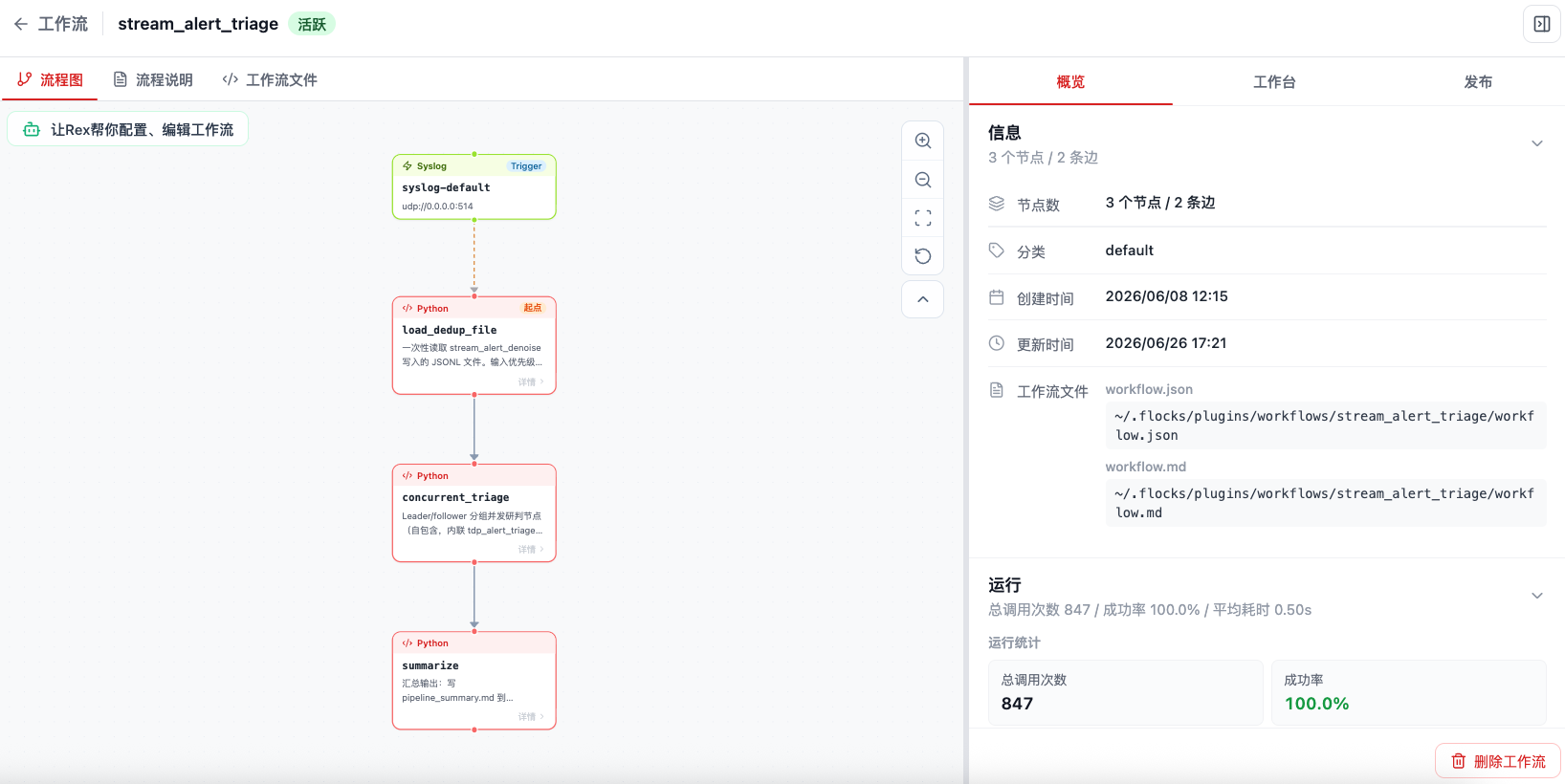
After placement, refresh Flocks. The system automatically scans Workflow directories under ~/.flocks/plugins/workflows and identifies and displays them on the Workflow page. After recognition, you can enter the detail page to view the flowchart, runtime statistics, and Workflow files.
For more Workflow installation and invocation methods, see Workflow and Invoke Workflow.
5. Enable Scheduled Triage
It is recommended to periodically call stream_alert_triage through Task Center -> Scheduled Tasks. The scheduled task runs the Workflow at the configured frequency, reads remaining log data processed by the real-time NDR alert denoising Workflow, and generates the triage report for that run.
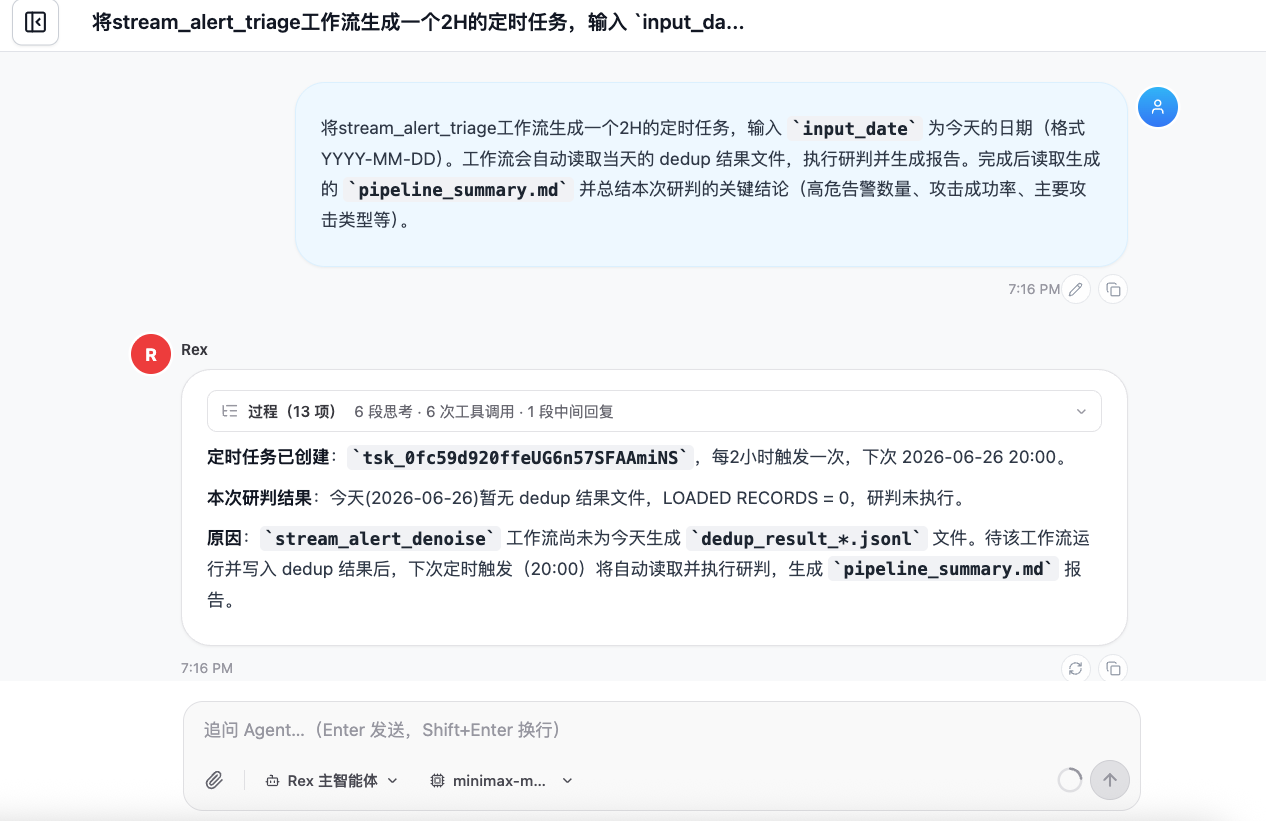
You can ask Rex in a session to create a scheduled task. The task description can be:
Run the stream_alert_triage Workflow with `input_date` set to today's date in YYYY-MM-DD format. The Workflow automatically reads the day's denoising result files, performs triage, and generates a report. After completion, read the generated `pipeline_summary.md` and summarize the key conclusions from this triage run, including high-risk alert count, attack success rate, and main attack types.Recommended frequency: every 2 to 6 hours. If log volume is high, shorten it to every 2 hours. If log volume is low or only a duty summary is needed, set it to every 4 to 6 hours.
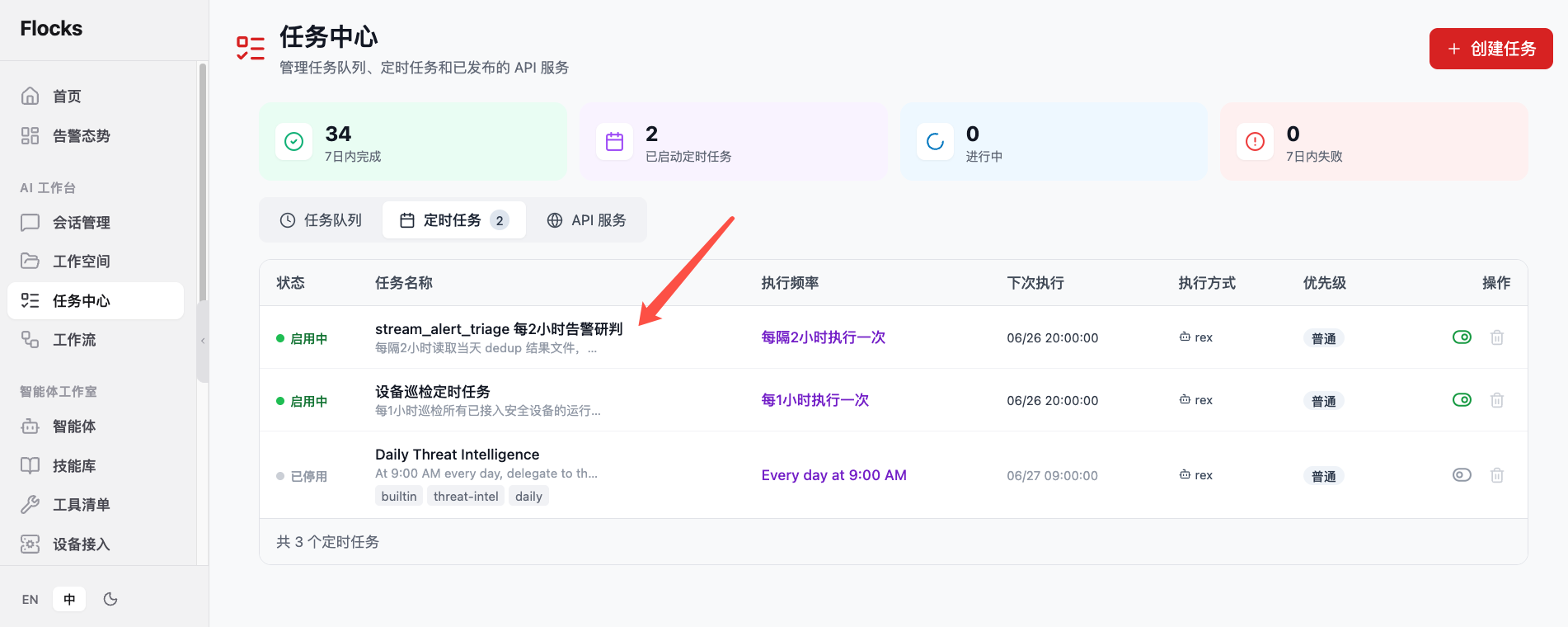
After creation, view the task status, execution frequency, next run time, and enabled / disabled state in Task Center -> Scheduled Tasks.
6. Runtime Results
After a scheduled task triggers, the Workflow reads the denoising results for the date specified by input_date. If the real-time NDR alert denoising Workflow has not generated result files for that day, the triage task reports that there is no processable data. After the alert denoising Workflow writes results, the next scheduled trigger automatically continues triage.
A successful run usually produces:
- Number of denoised logs read in this run.
- High-risk alert count and attack success rate.
- Main attack types, key source IPs, target assets, and URLs.
- Risk conclusions after combining intelligence, discovery, and vulnerability context.
- Structured triage fields for each alert, including whether it is an attack, whether the attack succeeded, confidence / risk level, decision result, and Flocks AI triage report.
pipeline_summary.mdtriage summary report.
The Workflow always returns structured results and writes an overview report:
~/.flocks/workspace/outputs/<YYYY-MM-DD>/artifacts/stream_alert_triage_summary.mdBy default, the complete triaged alerts are written to the SOC database rather than a JSONL file:
~/.flocks/data/soc.dbIf JSONL output is enabled, triage results are written to the workspace Workflow directory:
workspace/workflows/stream_alert_triage/Optional artifacts such as triage_result_NNN.jsonl are stored by date. Denoising results from the real-time NDR alert denoising Workflow are written to workspace/workflows/stream_alert_denoise/. stream_alert_triage reads those results, continues triage, and then writes to the SOC database, JSONL files, or both according to configuration.
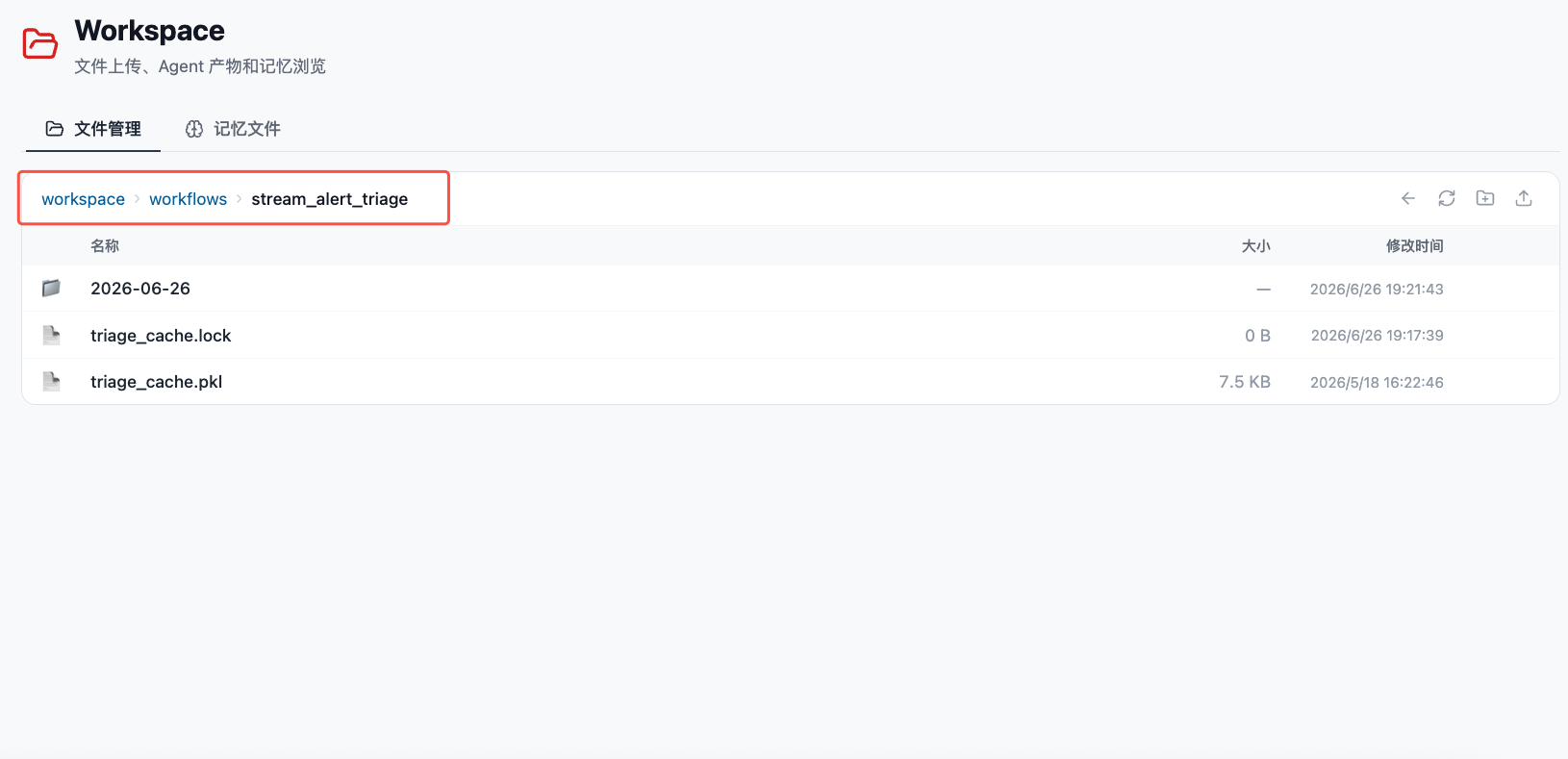
7. Write Modes and Database Fields
stream_alert_triage supports two persistence targets: the SOC database and JSONL files. The default configuration writes to the SOC database so the SOC workspace page and soc_workspace_query tool can query the data.
7.1 Output Modes
| Parameter | Default | Description |
|---|---|---|
triage_output_mode | soc_db | Specifies the output mode (soc_db, jsonl, both, or none). |
soc_db_path | ~/.flocks/data/soc.db | Default SOC database path. |
jsonl_output_dir | Empty | Optional JSONL output directory; if empty, uses workspace/workflows/stream_alert_triage/<YYYY-MM-DD>/. |
persist_triage_output | false | Legacy compatibility parameter; when set to true in soc_db mode, it additionally writes JSONL, equivalent to both. |
Behavior of each output mode:
| Output mode | Write SOC DB | Write JSONL | Use case |
|---|---|---|---|
soc_db | Yes | No | Default mode for SOC workspace pages and query tools. |
jsonl | No | Yes | Only file archiving or downstream script consumption is required. |
both | Yes | Yes | Both SOC workspace display and file artifacts are required. |
none | No | No | Only inspect the current Workflow return value; triage cache and overview reports may still be written. |
7.2 SOC Database Table Structure
Current default database file:
~/.flocks/data/soc.dbTriaged alerts are written to the alert_records table. The table structure is:
CREATE TABLE alert_records (
    row_id TEXT PRIMARY KEY,
    record_id TEXT,
    asset_date TEXT NOT NULL,
    source_file TEXT NOT NULL,
    line_number INTEGER NOT NULL,
    event_time INTEGER,
    source_type TEXT,
    threat_name TEXT,
    is_duplicate INTEGER NOT NULL DEFAULT 0,
    record_json TEXT NOT NULL
);
Field descriptions:
| Field | SQLite type | Required | Description |
|---|---|---|---|
row_id | TEXT | Yes, primary key | Unique database row ID, used to avoid writing the same source record repeatedly. |
record_id | TEXT | No | Original alert ID, usually from the id field in denoising results. |
asset_date | TEXT | Yes | Asset / alert date, usually in YYYY-MM-DD format, used for daily queries and partitioned display. |
source_file | TEXT | Yes | Source file for the record, usually the relative path or filename of upstream dedup_result_NNN.jsonl. |
line_number | INTEGER | Yes | Line number in the source JSONL file; the file header line is skipped. |
event_time | INTEGER | No | Alert event time, usually a Unix timestamp in seconds. |
source_type | TEXT | No | Alert source type, such as tdp or skyeye. |
threat_name | TEXT | No | Threat name, such as SQL injection, WebShell scanning, internal tunneling, and similar values. |
is_duplicate | INTEGER | Yes | Whether the alert is a duplicate. 0 means no, 1 means yes. |
record_json | TEXT | Yes | Complete alert JSON string, including denoising fields and triage fields. |
record_json keeps the full record, so detailed fields required by pages or query tools are usually parsed from it. Common contents include:
- Denoising stage fields:
dedup_key,is_duplicate,_lsh_cluster_id,_source_type,_process_type. - Network and HTTP fields:
sip,dip,sport,dport,direction,req_host,req_http_url,req_body,rsp_status_code,rsp_body. - Threat fields:
threat_rule_id,threat_name,threat_type,threat_phase,threat_result,threat_confidence. - Triage fields:
attack_verdict,attack_success,risk_level,confidence,decision,decision_label,report_title,triage_report,triage_status,triage_source,triage_ms.
The database creates indexes for common query fields:
CREATE INDEX idx_alert_records_asset_date ON alert_records(asset_date);
CREATE INDEX idx_alert_records_record_id ON alert_records(record_id);
CREATE INDEX idx_alert_records_source_type ON alert_records(source_type);
CREATE INDEX idx_alert_records_threat_name ON alert_records(threat_name);
CREATE INDEX idx_alert_records_duplicate ON alert_records(is_duplicate);
7.3 Data Contract Metadata Table
The database also contains the contract_meta table, which stores metadata for the data contract between written data and the frontend UI. The SOC workspace page and query tool can use this table to determine which schema should be used to parse alert_records.record_json, and which source files generated the current database.
Table structure:
CREATE TABLE contract_meta (
    key TEXT PRIMARY KEY,
    value TEXT NOT NULL
);
Field descriptions:
| Field | SQLite type | Required | Description |
|---|---|---|---|
key | TEXT | Yes, primary key | Metadata key name. |
value | TEXT | Yes | Metadata value. It can be a plain string or a JSON string. |
Common current keys:
| key | Example value | Description |
|---|---|---|
schemaVersion | soc.alerts.sqlite.v1 | SOC alerts SQLite data contract version. The frontend UI and query tools should use this version first to select parsing logic. |
generatedAt | 2026-07-01T13:36:57 | Database or batch generation time, used to judge data freshness. |
sourceRoot | ~/.flocks/plugins/contracts/webui/soc_ui/.../assets | Data contract or frontend asset root, used to help the UI find the corresponding contract, field mapping, or static resources. |
recordCount | 6427 | Alert count at current write or generation time, useful for page display, validation, and troubleshooting. |
sourceFiles | ["2026-07-01/dedup_result_001.jsonl"] | List of source files for this batch, usually a JSON string array. |
The core purpose of contract_meta is to connect the database table structure, business fields in record_json, and the frontend UI display contract:
- The write side declares the current
record_jsonfield semantics throughschemaVersion. - The frontend UI uses
schemaVersionto decide how to parse alert fields, triage fields, and aggregation logic. sourceRootpoints to the SOC UI data contract or resource location, making it easier for pages to load field mappings, chart configuration, or default display rules.recordCountandsourceFilesmake it easy to determine whether the amount of data shown on the page matches the write batch.
If the record_json field structure, field names, or frontend display contract changes later, update schemaVersion at the same time and ensure that the SOC workspace UI, soc_workspace_query, and write Workflow use the same contract.
7.4 JSONL File Writing
When triage_output_mode=jsonl, triage_output_mode=both, or the legacy parameter persist_triage_output=true takes effect, the Workflow writes triage JSONL files:
~/.flocks/workspace/workflows/stream_alert_triage/<YYYY-MM-DD>/triage_result_NNN.jsonlThe first line of each JSONL file is the file header, containing batch information such as workflow, seq, run_id, batch_total, batch_triaged, batch_followers_reused, batch_cache_hit, and batch_triage_failed. Each following line is a complete alert record with triage fields.
8. Output JSON Example
stream_alert_triage reads the denoising results produced by stream_alert_denoise and appends triage fields to each alert. In addition to the human-readable Flocks AI triage report, the result also contains structured decisions that can be used for database writes, filtering, and automated handling.
The core decision fields can be understood as follows:
| Field | Description |
|---|---|
attack_verdict | Final Flocks AI decision. Common values include attack_success, attack_failed, attack, unknown, and benign. |
attack_success | Whether the attack succeeded. true means the triage concluded the attack succeeded. |
risk_level | Risk / confidence strength level, usually High, Medium, or Low. |
triage_report | Full triage report generated by Flocks AI, including evidence, attack payload, response characteristics, and handling recommendations. |
triage_status | Triage execution status for this alert, such as ok, cached, reused_from_leader, or failed. |
triage_source | Triage source, such as new triage, cache reuse, or same-batch follower reuse. |
For business systems, attack_verdict can be used directly as the "successful decision result" field, or it can derive more intuitive display fields such as is_attack, attack_succeeded, and confidence.
A shortened result after one run:
{
  "summary_path": "~/.flocks/workspace/outputs/2026-06-26/artifacts/stream_alert_triage_summary.md",
  "top_attack_verdict": "attack_success",
  "top_risk_level": "High",
  "top_report_title": "SQL injection attack succeeded; immediate handling required",
  "top_triage_report": "# SQL Injection Triage Report\n\n## Triage Conclusion\nThis alert has clear attack payload and response evidence, and is assessed as a successful attack...",
  "triage_stats": {
    "total": 3,
    "unique_dedup_keys": 2,
    "work_units": 2,
    "cache_hit": 0,
    "followers_reused": 1,
    "triaged": 2,
    "triage_failed": 0,
    "verdict_counts": {
      "attack_success": 1,
      "attack_failed": 1
    },
    "elapsed_ms": 18420,
    "output_paths": [
      "~/.flocks/workspace/workflows/stream_alert_triage/2026-06-26/triage_result_001.jsonl"
    ]
  },
  "triage_results": [
    {
      "dedup_key": "b7428a52e96c835c9f72efb555d36772",
      "has_dedup_key": true,
      "threat_name": "SQL injection",
      "sip": "1.2.3.4",
      "dip": "10.0.0.1",
      "is_duplicate": false,
      "triage_source": "triaged",
      "triage_status": "ok",
      "attack_verdict": "attack_success",
      "risk_level": "High",
      "report_title": "SQL injection attack succeeded; immediate handling required",
      "triage_ms": 9210,
      "triage_error": null
    }
  ]
}
To view the complete triage result for a single alert, read enriched_alerts_with_triage or triage_result_NNN.jsonl. These records retain the denoising stage fields and append triage fields:
{
  "id": "AZtRkZkzj",
  "sip": "1.2.3.4",
  "dip": "10.0.0.1",
  "req_http_url": "/admin?id=1' or '1'='1",
  "threat_name": "SQL injection",
  "dedup_key": "b7428a52e96c835c9f72efb555d36772",
  "is_duplicate": false,
  "has_dedup_key": true,
  "triage_source": "triaged",
  "triage_status": "ok",
  "attack_verdict": "attack_success",
  "attack_success": true,
  "risk_level": "High",
  "confidence": "High",
  "is_attack": true,
  "attack_succeeded": true,
  "decision": "attack_success",
  "decision_label": "attack succeeded",
  "report_title": "SQL injection attack succeeded; immediate handling required",
  "triage_report": "# SQL Injection Triage Report\n\n## Triage Conclusion\nThis request contains an obvious SQL injection payload, and the response shows abnormal echoed database content. Combined with intelligence and HTTP response evidence, it is assessed as a successful attack.\n\n## Key Evidence\n- The request path contains SQL injection characteristics\n- The target service returned abnormal database-related content\n- The source IP matched threat intelligence records\n\n## Recommended Handling\nBlock the source IP, review access logs on the target asset, and apply parameterized fixes to the affected APIs.",
  "triage_ms": 9210
}
In the example, is_attack, attack_succeeded, confidence, decision, and decision_label are business-facing read semantics: decision corresponds to the Workflow-native attack_verdict, attack_succeeded corresponds to attack_success, and confidence can be normalized by risk_level and the evidence strength in the report.
9. Production Checklist
Before formal enablement, confirm:
- The Flocks default large model is available and its capability satisfies batch triage requirements.
- The real-time NDR alert denoising Workflow has integrated TDP, SkyEye, or another NDR log source.
- The alert denoising Workflow has generated result files for the current day.
- The
stream_alert_triageWorkflow can read the directory containing denoising result files. - The default output mode matches expectations: keep
triage_output_mode=soc_db, or switch tojsonl/both/noneas needed. - If using the SOC workspace display, confirm
~/.flocks/data/soc.dbis writable andalert_recordscontains data. - The scheduled task frequency is reasonable and does not compete with log writing, report generation, or channel notifications for resources.
Related Resources: Alert Triage · Real-time NDR Alert Denoising Workflow · Task Center · Invoke Workflow